Unexpected use of resources by the forms designer
Over a long period, some users have reported problems with code generated in the function InitializeComponent(), looking something like this:
this.labelX9.BackgroundStyle.Class = global::YourProject.MultiLang._668;
The reference to MultiLang obviously implicates the Multi-Language Add-In, but the code in InitializeComponent() is neither generated nor modified by the Add-In. This effect has always baffled me.
Now I think I know what is happening, and I can illustrate it with a sample program. This sample contains several parts, which I will try to describe in detail.
Sample Program
This sample defines
- a Class
- a UserControl which exposes a property of that class
- a Form which uses the UserControl
- a resource file
I have made the sample in VB, but it could just as easily be in C#. I am sure that there is no difference.
The class
Imports System.ComponentModel

<TypeConverterAttribute(GetType(ExpandableObjectConverter))> _
Public Class MyObject

  Private mEmpty      As String = ""

  Public Property Empty as String
    Get
      Return mEmpty
    End Get
    Set(ByVal value As String)
      mEmpty = value
    End Set
  End Property

End Class
This class contains a single String property, which is initialized with an empty string.
This property can have the <Localizable(True)> attribute, but this is not necessary.
The UserControl
This is the user defined code in the UserControl. Obviously there is more code in the .designer.vb file, but that does not interest us.
Imports System.ComponentModel

Public Class ControlWithObject

  Private mObject As New MyObject

  <DesignerSerializationVisibility(DesignerSerializationVisibility.Content)> _
  Public ReadOnly Property ChildObject as MyObject
    Get
      Return mObject
    End Get
  End Property

End Class
This UserControl has a single property named ChildObject, of type MyObject.
The form
I have placed a single instance of the UserControl ControlWithObject on the form.
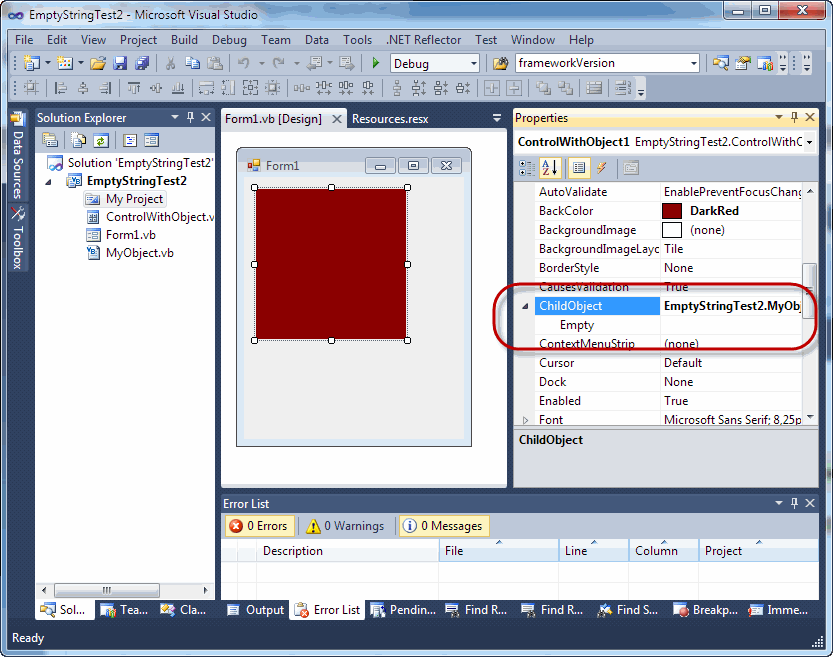
As you can see, the ChildObject property can be expanded in the properties window.
This form contains no user defined code.
The resource file
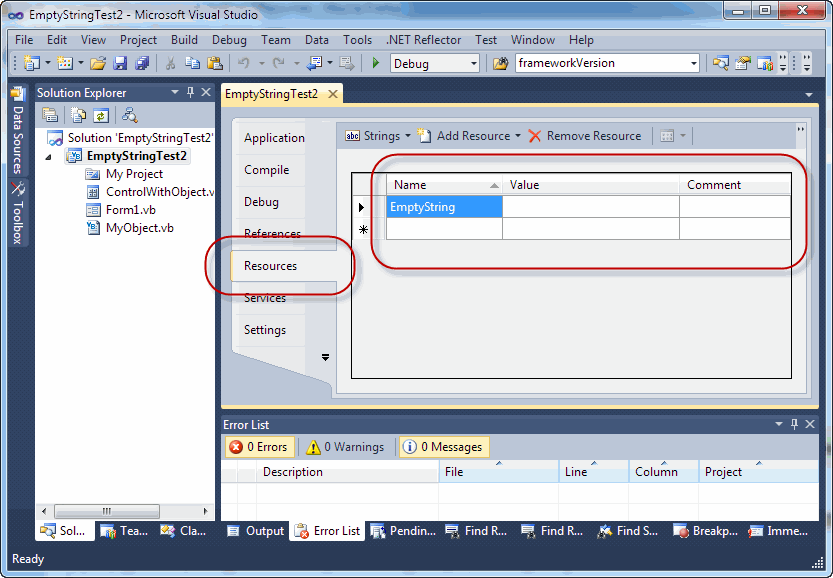
I have a single resource strings to the project, named EmptyString and containing an empty string.
InitializeComponent
Before going any further, I want to take a look at some of the code in InitializeComponent(), in the .designer.vb file.
'
'ControlWithObject1
'
Me.ControlWithObject1.BackColor = System.Drawing.Color.DarkRed
Me.ControlWithObject1.ChildObject.Empty = ""
Me.ControlWithObject1.Location = New System.Drawing.Point(12, 12)
Me.ControlWithObject1.Name = "ControlWithObject1"
Me.ControlWithObject1.Size = New System.Drawing.Size(150, 150)
Me.ControlWithObject1.TabIndex = 0
What happens when we set Localizable=True
Now lets look at what happens when we set the Localizable property of the form to True.
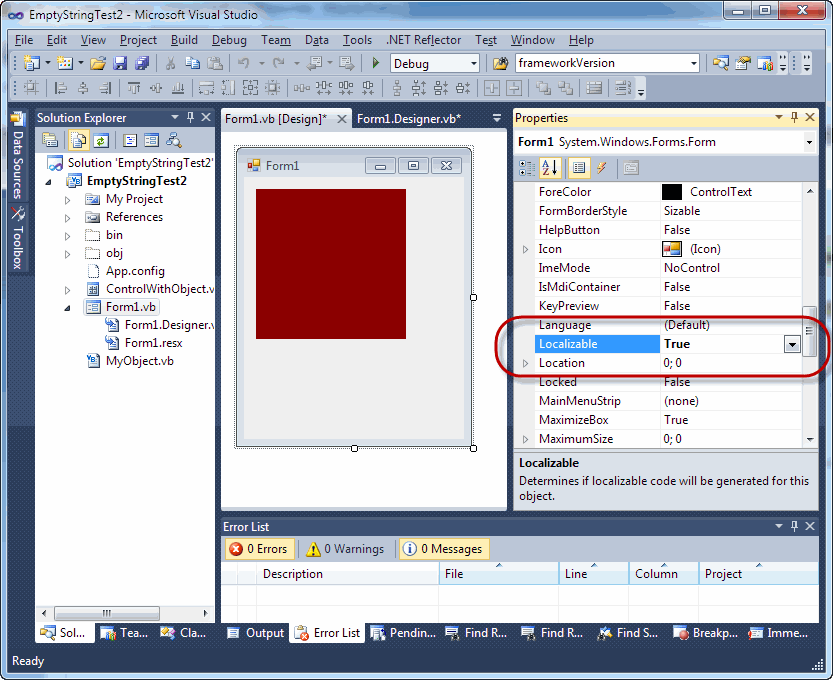
As you probably know, this modifies the code generated in InitializeComponent. Lets take a look at the now code.
'
'ControlWithObject1
'
Me.ControlWithObject1.BackColor = System.Drawing.Color.DarkRed
Me.ControlWithObject1.ChildObject.Empty = Global.EmptyStringTest2.My.Resources.Resources.EmptyString
resources.ApplyResources(Me.ControlWithObject1, "ControlWithObject1")
Me.ControlWithObject1.Name = "ControlWithObject1"
As we would expect, a call to resources.ApplyResources() has been added, which loads the localizable properties from a resource file. The actual values of these properties have been moved into the resource file Form1.resx.
However, this does not apply to the properties of ChildObject.
Here something rather strange has happened. The property ChildObject.Empty, which contains an empty string, is now loaded from the resource string EmptyString.
This is strange for two reasons:
- The property Empty is does not have the localizable attribute
- The resource is read from the global resource file resources.resx and not the local resource file form1.resx
Summary
The effect is, that the forms designer decides to load a property from a resource string, for no apparent reason.
So far as I can tell:
- It only happens for string properties of child objects
- It only happens for empty strings
- It does not matter whether the string property has the localizable attribute or not
- The forms designer uses an existing resource containing an empty string
- The resource string comes from a global resource file. This might be
- the default resource file Resources.resx
- the resource file MultiLang.resx
- The resource string does not come from a local resource file (e.g. Form1.resx)
- The effect can be provoked by setting the Localizable property of the Form to True.
There may be other ways to provoke it.
What does this mean for the Multi-Language Add-In
If:
- the resource file MultiLang.resx contains an empty resource string
- a control contains an object property
- that object contains a string property
- that string property contains an empty string
then the forms designer may decide to load that string property from the empty resource string in MultiLang.resx.
Is this a problem?
This effect may lead to a compilation error. In fact, you will probably only notice it if it does cause a compilation error.
It will cause a compilation error, if there is no (automatically generated) code file for the resource file.
There are two ways to tell Visual Studio to generate a code file:
- With the access modifier in the resource editor
- With the Custom Tool property of the resource file
The access modifier field is at the top left hand corner of the resource editor.
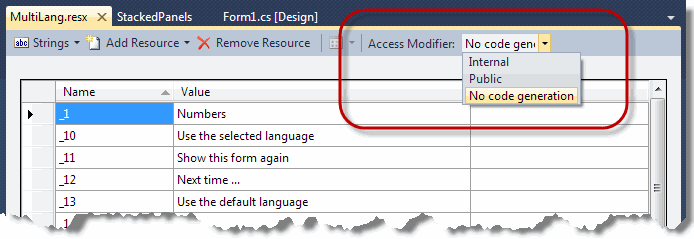
It usually has three values:
- Internal (C#) or Friend (VB)
- Public
- No code generation
The Custom Tool property
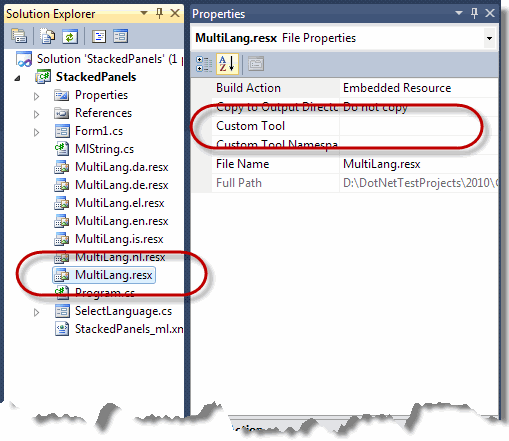
can have one of the values:
- ResXFileCodeGenerator
- PublicResXFileCodeGenerator
- (empty)
These settings are exactly equivalent to the access modifiers Internal/Friend, Public and No code generation. (By the way, it is apparently not possible to select "No code generation" for the default resource file resource.resx.)
How to fix it
This problem is easily fixed, by changing the access modifier to Internal/Friend or Public. I see no particular reason why the properties should be public, so I would recommend selecting Internal/Friend.
Why does this effect happen so rarely?
This problem is very unusual, for two reasons:
- The Add-In does not usually generate empty resource strings
- Child objects as defined in the sample above are unusual. It is even more unusual for them to have properties which are empty strings.
The Add-In usually suppresses any properties which contain empty strings. There are no sensible cases where you would want to translate an empty string. However, if you change the value of property which was not empty to an empty string, I think you could generate an empty resource string.
Another possible cause would be an error in the Add-In. In fact, I believe there was such an error in the version for Visual Studio 2010, related to the handling of extended properties (e.g. Tooltip properties). This specific error has been fixed in version 4.72.0012.
There are possibly no cases of child objects with empty string properties in all of the standard controls provided by Microsoft. The most recent reports that I have had concerned the DotNetBar component from DevComponents, and in particular the BackgroundStyle.Class property.
How to avoid it
The way to avoid this error is to avoid having empty resource strings.
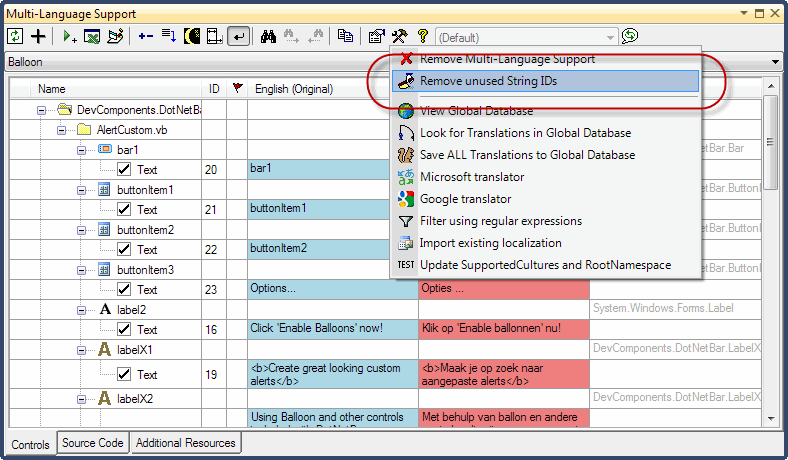
If this effect occurs, then you should try to locate where the specific string-ID is used in your project and deselect the relevant properties or source code strings. You can then remove the string-ids from the project database using the command "Remove unused String IDs" in the tools menu.